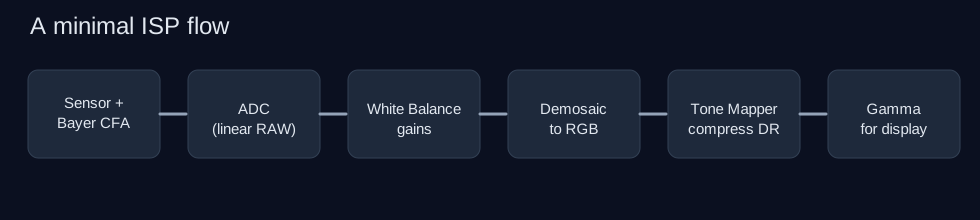
If you strip a camera pipeline to the essentials, a basic Image Signal Processor (ISP) can be viewed as a sequence of simple transformations:
- Sample light with a Bayer color filter array (CFA)
- Convert analog sensor signal with an ADC
- Process in the linear RAW domain
- Apply white-balance gains
- Demosaic to full RGB
- Apply a basic tone mapper
- Gamma-encode for display
1) Bayer data: what the sensor actually captures
Most sensors do not measure full RGB at each pixel. Instead, each photosite sits under one color filter (typically RGGB):
- red sample
- green sample
- green sample
- blue sample
This means each pixel location contains only one color channel at first.
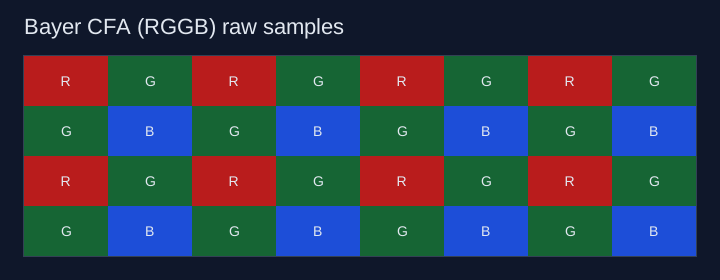
Why two greens? Human vision is more sensitive to luminance detail, and luminance is strongly represented by green.
2) ADC: analog to digital conversion
Sensor output starts as an analog charge/current and is converted by an ADC (Analog-to-Digital Converter) to integer code values.
For a 12-bit ADC, values are usually in [0, 4095] (before black-level correction and clipping logic). Higher bit depth allows finer quantization.
At this stage, the signal is still typically considered RAW and linear with respect to scene radiance.
3) Linear domain data
In the linear domain, doubling incoming light roughly doubles signal value.
That linearity is important for physically meaningful operations:
- scaling channels for white balance,
- some denoising/statistics steps,
- HDR merges and exposure fusion,
- camera calibration math.
A common beginner mistake is to do physically based operations after gamma; for foundational ISP steps, linear is usually the safest place.
4) White balancing (basic gain model)
A simple white balance model is per-channel gain:
R' = gR * RG' = gG * GB' = gB * B
You can interpret this as compensating the scene illuminant (for example, warm indoor light that pushes red/yellow).
In a minimal ISP, gains are often computed from:
- metadata from auto white balance (AWB), or
- a simple gray-world assumption.
This step is usually done before demosaicing or early in the pipeline depending on implementation details.
5) Demosaicing
Because Bayer gives one channel per pixel location, we must reconstruct the missing two channels to get full RGB at every output pixel. That process is demosaicing.
Basic options:
- nearest neighbor (very fast, lower quality),
- bilinear interpolation (classic baseline),
- edge-aware methods (better quality, more compute).
For a “most basic ISP,” bilinear interpolation is a good conceptual and practical baseline.
6) Basic tone mapping
Linear camera data has wide dynamic range relative to display range. Tone mapping compresses highlights and shapes contrast to look natural on SDR displays.
Simple tone mappers often used for teaching:
- Reinhard global:
x / (1 + x) - filmic-like curves (piecewise or polynomial)
- simple shoulder roll-off with optional exposure scaling
Even a simple global operator helps preserve highlight detail better than hard clipping.
7) Gamma correction for display
Displays and human perception are non-linear. To store/render efficiently for standard displays, we apply a gamma-like transfer (or sRGB OETF approximation).
Conceptually:
- linear-to-display encoding:
out = in^(1/gamma)withgamma ≈ 2.2(simplified view)
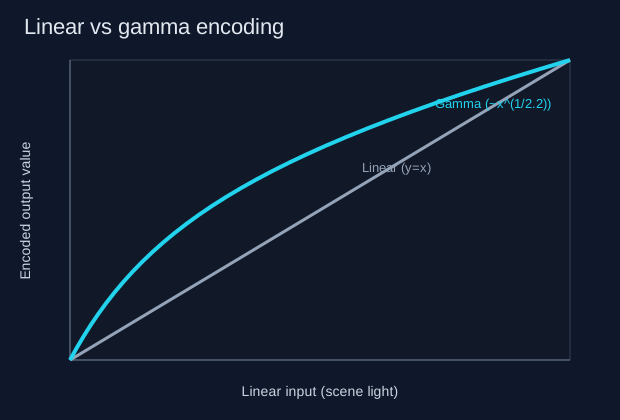
After gamma encoding, mid-tones receive more code precision where human vision is more sensitive.
Putting it all together
A minimal end-to-end chain looks like:
Bayer capture -> ADC -> linear RAW -> white balance -> demosaic -> tone map -> gamma encode
That is enough to understand the core ISP ideas before adding advanced blocks like denoise, sharpening, color correction matrices, local tone mapping, temporal processing, and HDR-specific logic.